
笔沫

有梦为马,随处可栖

  • 主页
  • 技术
  • 随想
  • 音乐
所有文章 其他

笔沫

有梦为马,随处可栖

  • 主页
  • 技术
  • 随想
  • 音乐

【转载】Android Studio Gradle编译优化方法

2017-08-08

前言:最近发现Gradle项目编译越来越慢,有时甚至需要好几十分钟,实在是让人难以忍受。于是,便搜寻于网络,经过验证,发现此方案尤其有效,故留此博客,以备以后之需。

第1步:

打开AS安装所在的位置,用记事本打开studio64.exe.vmoptions文件。具体如图:

第2步:

打开“studio64.exe.vmoptions”文件后修改里面的值,修改后如下:

1
2
3
4
5
6
7
8
9
10
11
12
13
14
15
16
17
18
19
20
21
22
23
#
# *DO NOT* modify this file directly. If there is a value that you would like to override,
# please add it to your user specific configuration file.
#
# See http://tools.android.com/tech-docs/configuration
#
-Xms2048m
-Xmx2048m
-XX:MaxPermSize=2048m
-XX:ReservedCodeCacheSize=1024m
-XX:+UseConcMarkSweepGC
-XX:SoftRefLRUPolicyMSPerMB=50
-da
-Djna.nosys=true
-Djna.boot.library.path=
-Djna.debug_load=true
-Djna.debug_load.jna=true
-Dsun.io.useCanonCaches=false
-Djava.net.preferIPv4Stack=true
-XX:+HeapDumpOnOutOfMemoryError
-Didea.paths.selector=AndroidStudio2.0
-Didea.platform.prefix=AndroidStudio

第3步:

打开你的项目中的“gradle.properties”文件复制如下内容:

1
2
3
4
5
6
7
8
9
10
11
12
13
14
15
16
17
18
19
20
21
22
# Project-wide Gradle settings.
# IDE (e.g. Android Studio) users:
# Settings specified in this file will override any Gradle settings
# configured through the IDE.
# For more details on how to configure your build environment visit
# http://www.gradle.org/docs/current/userguide/build_environment.html
# The Gradle daemon aims to improve the startup and execution time of Gradle.
# When set to true the Gradle daemon is to run the build.
# TODO: disable daemon on CI, since builds should be clean and reliable on servers
org.gradle.daemon=true
# Specifies the JVM arguments used for the daemon process.
# The setting is particularly useful for tweaking memory settings.
# Default value: -Xmx10248m -XX:MaxPermSize=256m
org.gradle.jvmargs=-Xmx2048m -XX:MaxPermSize=512m -XX:+HeapDumpOnOutOfMemoryError -Dfile.encoding=UTF-8
# When configured, Gradle will run in incubating parallel mode.
# This option should only be used with decoupled projects. More details, visit
# http://www.gradle.org/docs/current/userguide/multi_project_builds.html#sec:decoupled_projects
org.gradle.parallel=true
# Enables new incubating mode that makes Gradle selective when configuring projects.
# Only relevant projects are configured which results in faster builds for large multi-projects.
# http://www.gradle.org/docs/current/userguide/multi_project_builds.html#sec:configuration_on_demand
org.gradle.configureondemand=true

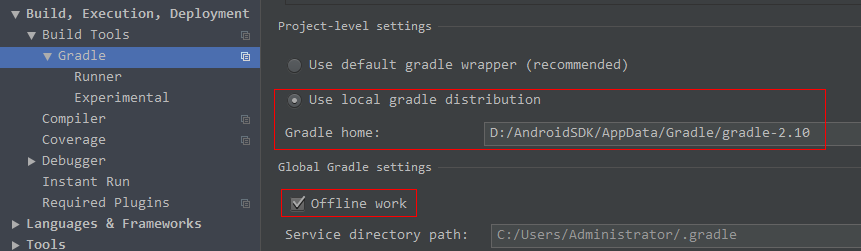
第4步:

修改gradle-wrapper.properties文件,如图:

第5步:

Gradle官网下载地址:http://services.gradle.org/distributions
如图:
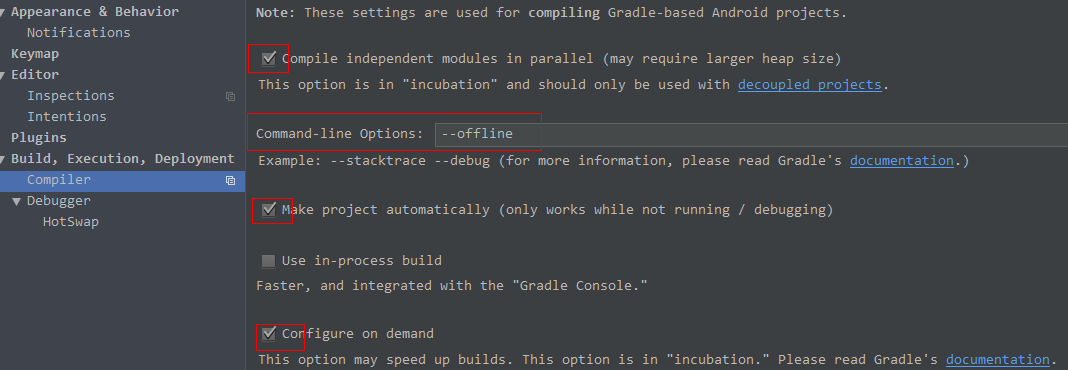
第6步:

具体如图:
第7步:

重新编译一下项目,结果如图:


参考资料:
Android Studio Gradle优化方法(一般人我不告诉他)

赏

感谢认可,么么哒

支付宝
微信
  • 技术
  • AS Gradle优化

扫一扫,分享到微信

微信分享二维码
执着的人是幸福的
Annontation注解的应用及介绍
© 2019 笔沫
Hexo Theme Yilia by Litten
  • 所有文章
  • 其他

tag:

  • 技术
  • Android
  • Activity的启动模式
  • Android注解
  • Java反射机制
  • Java动态代理
  • Android基础
  • MVP
  • NDK
  • JNI C/C++
  • 开源框架
  • AS Gradle优化
  • 博客搭建
  • 设计模式
  • Fragment
  • Rxjava
  • Rxandroid
  • 响应式编程
  • 随想
  • 你本是一个肉体,是什么驱使你前行
  • 原创
  • 笔沫拾光
  • Java
  • Java基础
  • 王阳明心学
  • 中国历史
  • 人生的意义
  • 演讲
  • 执着的人是幸福的
  • 郭川
  • Android框架源码解析
  • 加解密算法
  • Binder通信机制
  • 开源框架源码解析
  • LeakCanary框架源码分析
  • Java集合类
  • 转载
  • Http文件断点续传
  • Logger框架源码解析
  • Android应用程序入口源码解析
  • DecorView绘制流程
  • Android消息机制源码解析
  • Activity启动流程
  • Butterknife框架源码解析
  • 我之存在,因为有你
  • 霍华德*舒尔茨
  • Android相机
  • Camera
  • 悬浮窗
  • WindowManager

    缺失模块。
    1、请确保node版本大于6.2
    2、在博客根目录(注意不是yilia根目录)执行以下命令:
    npm i hexo-generator-json-content --save

    3、在根目录_config.yml里添加配置:

      jsonContent:
        meta: false
        pages: false
        posts:
          title: true
          date: true
          path: true
          text: false
          raw: false
          content: false
          slug: false
          updated: false
          comments: false
          link: false
          permalink: false
          excerpt: false
          categories: false
          tags: true
    

  • 风光摄影
  • 星空摄影
  • 人像摄影
  • 学习站点